AI-Powered Chatbot for Financial Workflows
U&UX Design, Product Strategy, User Research, AI Model, Machine Learning Strategy, Data Visualization
Jan 2024 - Nov 2024
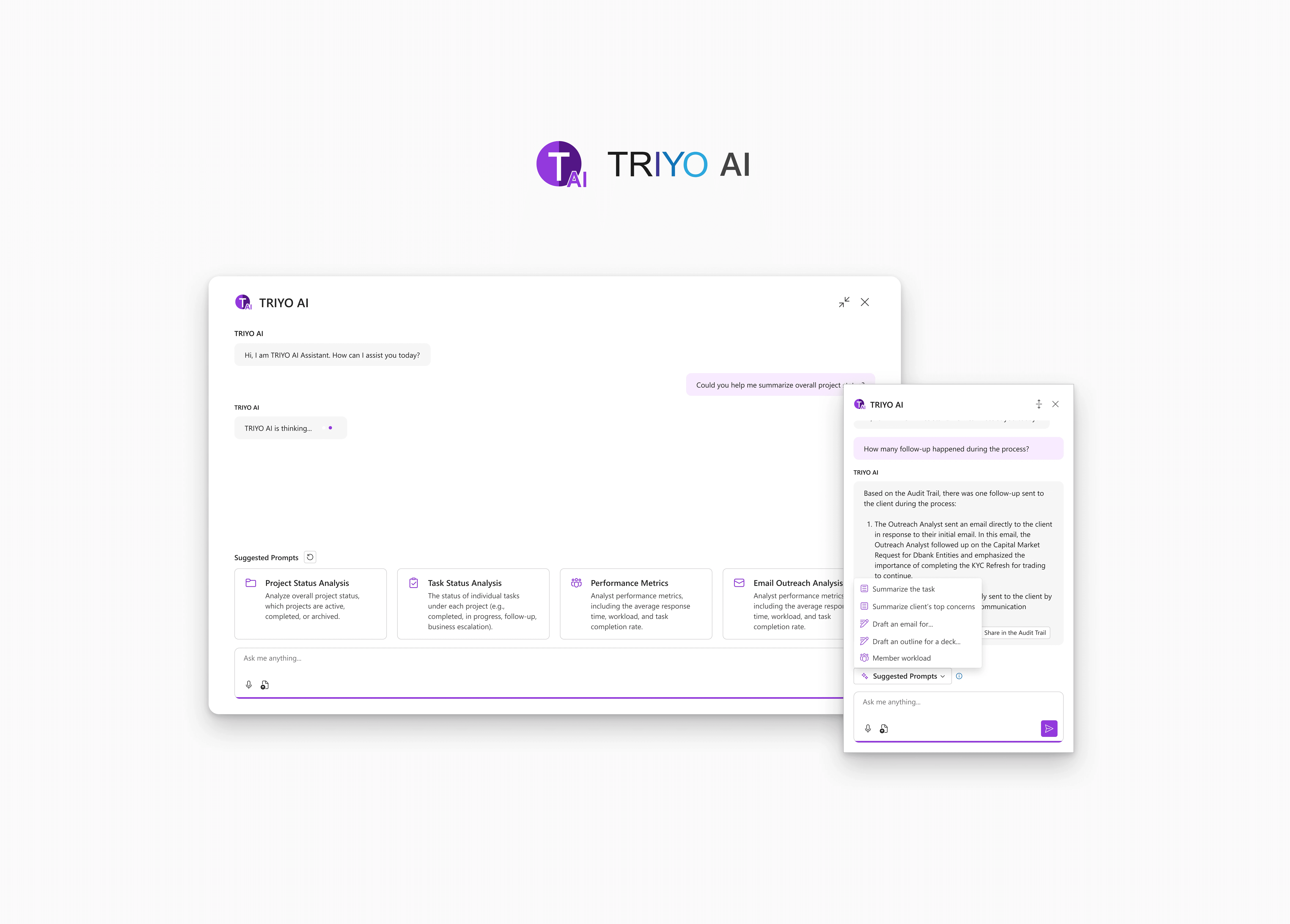
Integrates an AI-powered chatbot into TRIYO Outlook Add-in to enhance task management and streamline outreach workflows for financial professionals. The solution is designed to support informed decision-making while maintaining seamless integration with existing workflows.
Background
Revolutionizing How Financial Professionals Work
Imagine you're trying to open a new bank account or apply for a loan. The process involves signing forms, submitting multiple documents, and waiting while the bank verifies your information. Known as Know Your Customer (KYC), this process is crucial for banks to ensure the security of transactions. However, for both customers and financial professionals, KYC often feels slow, complex, and inefficient, especially when conducted primarily through email communications.
TRIYO enhances email platforms like Microsoft Outlook by equipping financial professionals with powerful email tracking and task management tools. With TRIYO, team members can view all email communications tied to a specific client or deal in one place, streamlining collaboration and reducing the risk of miscommunication (see more on the previous project, TRIYO Audit Trail, which focuses on redesign of email tracking functionalities).
In this project, we took TRIYO Audit Trail a step further by integrating an AI-powered chatbot, leveraging Artificial Intelligence (AI) and Machine Learning (ML) to enhance the productivity in the KYC process. Our goal was to provide financial professionals with actionable insights and augment their workflows, helping them make more informed decisions while reducing the manual workload.
My role
Planning & Scoping
Collaborated with all stakeholders to define the product scope, ensuring a balance between user needs and technical constraints. Working alongside developers and the product team to design the AI model for the chatbot.
Design
Co-led the design of the AI Chatbot interfaces for both the web and Microsoft Outlook add-in versions, collaborating with Han Cheng, another UI/UX designer. Focused on creating an intuitive user experience that met the unique demands of financial professionals.
Feedback & Data Collection
Designed a feedback collection mechanism to capture user insights, enabling continuous product improvement and fine-tuning of the AI model based on real-world usage data.
Decide if AI adds value to the existing features
Persona Development
In the current use case, each KYC process typically involves a team collaborating to collect essential client documents. The primary communication occurs through Microsoft Outlook. The team tracks all emails and documents in the task's Audit Trail, accessible by all team members, promoting transparent communication.
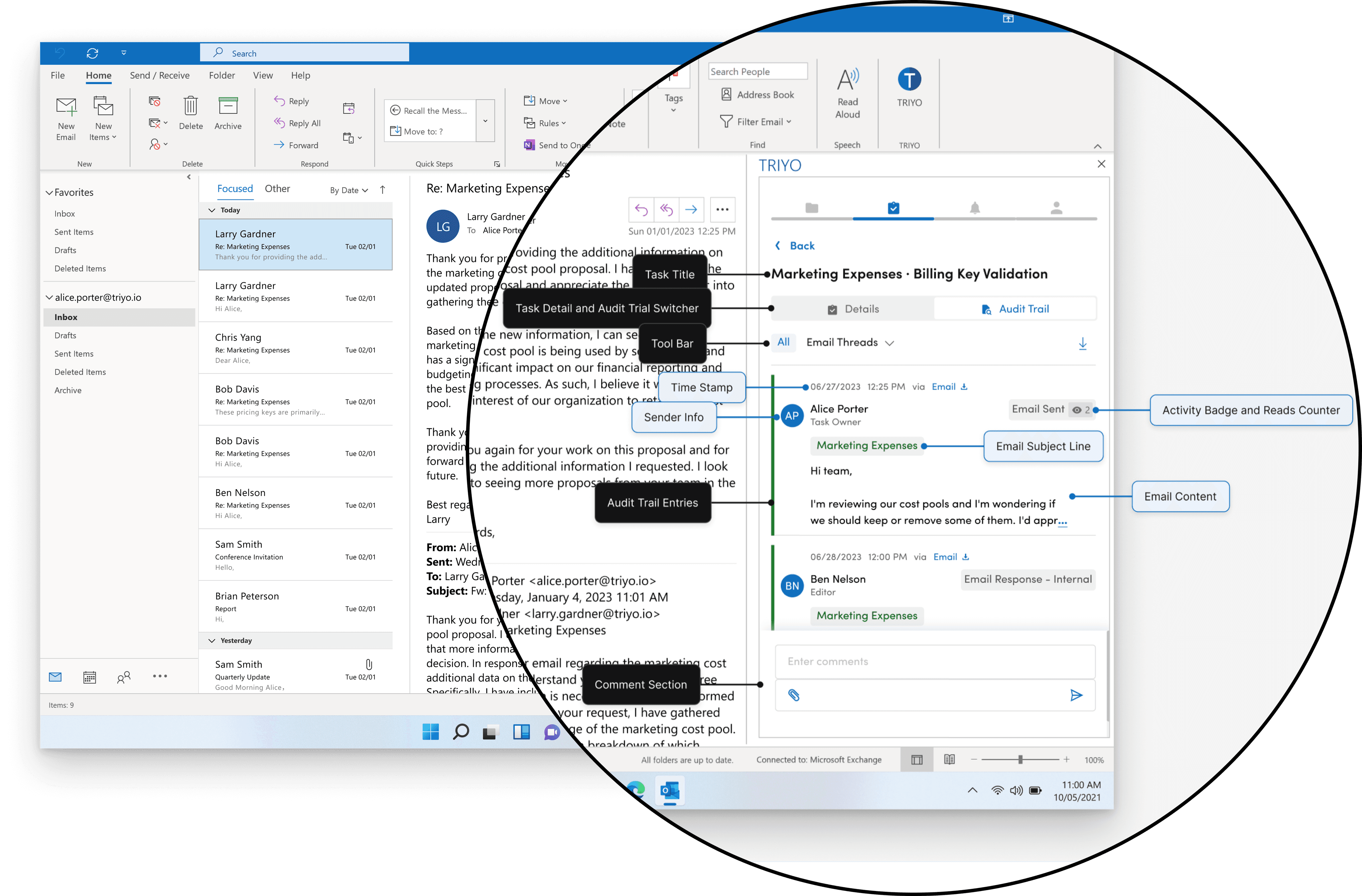
TRIYO Audit Trial
To better understand the process, we first developed personas for the three distinct user groups involved
01
User group
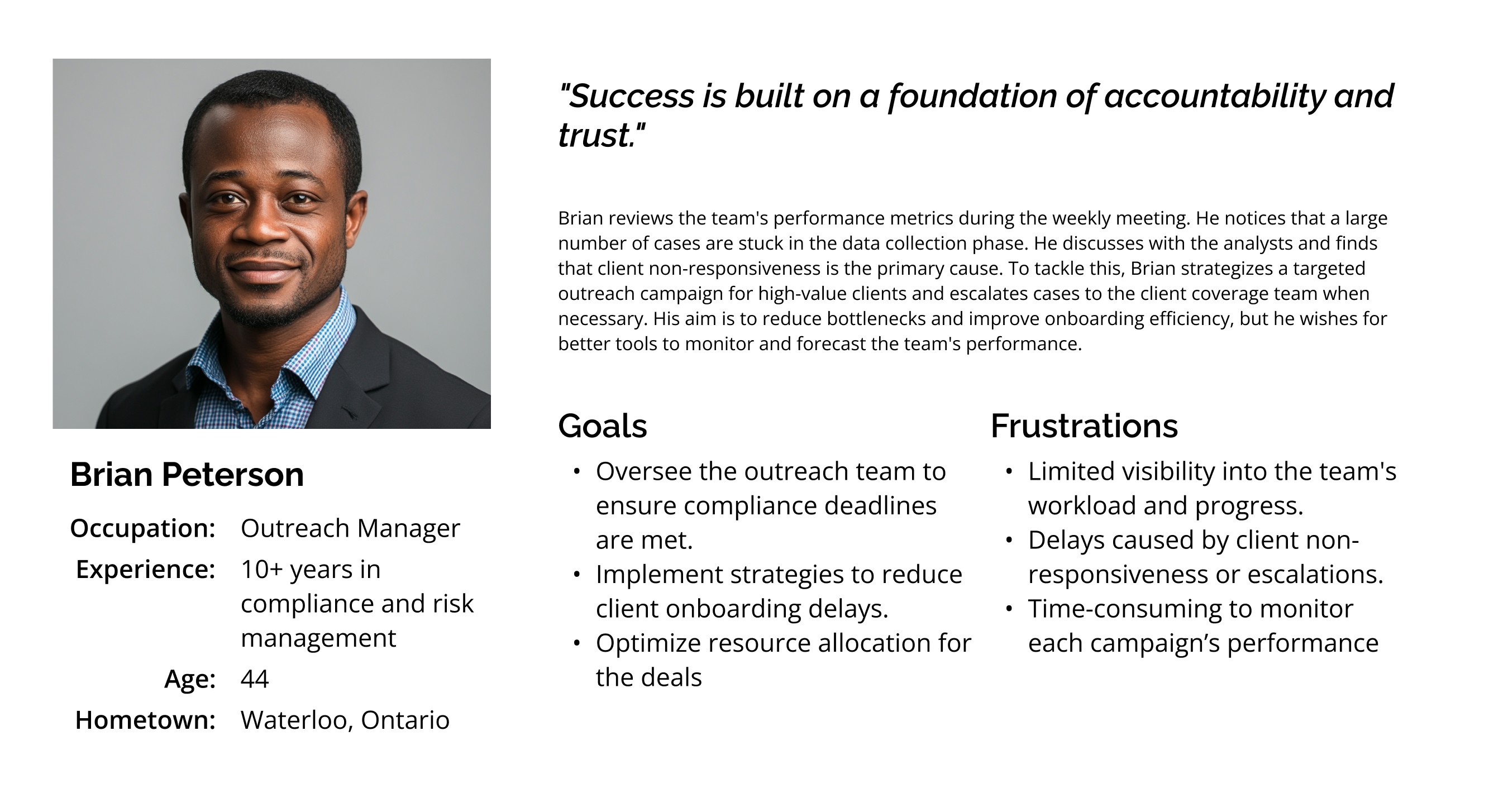
Outreach Manager
Problem Statement:
Brian is an experienced outreach manager who needs an efficient way to monitor his team’s performance and manage client onboarding, because he has limited visibility into his team's workload and progress, and client non-responsiveness often causes delays.
02
User group
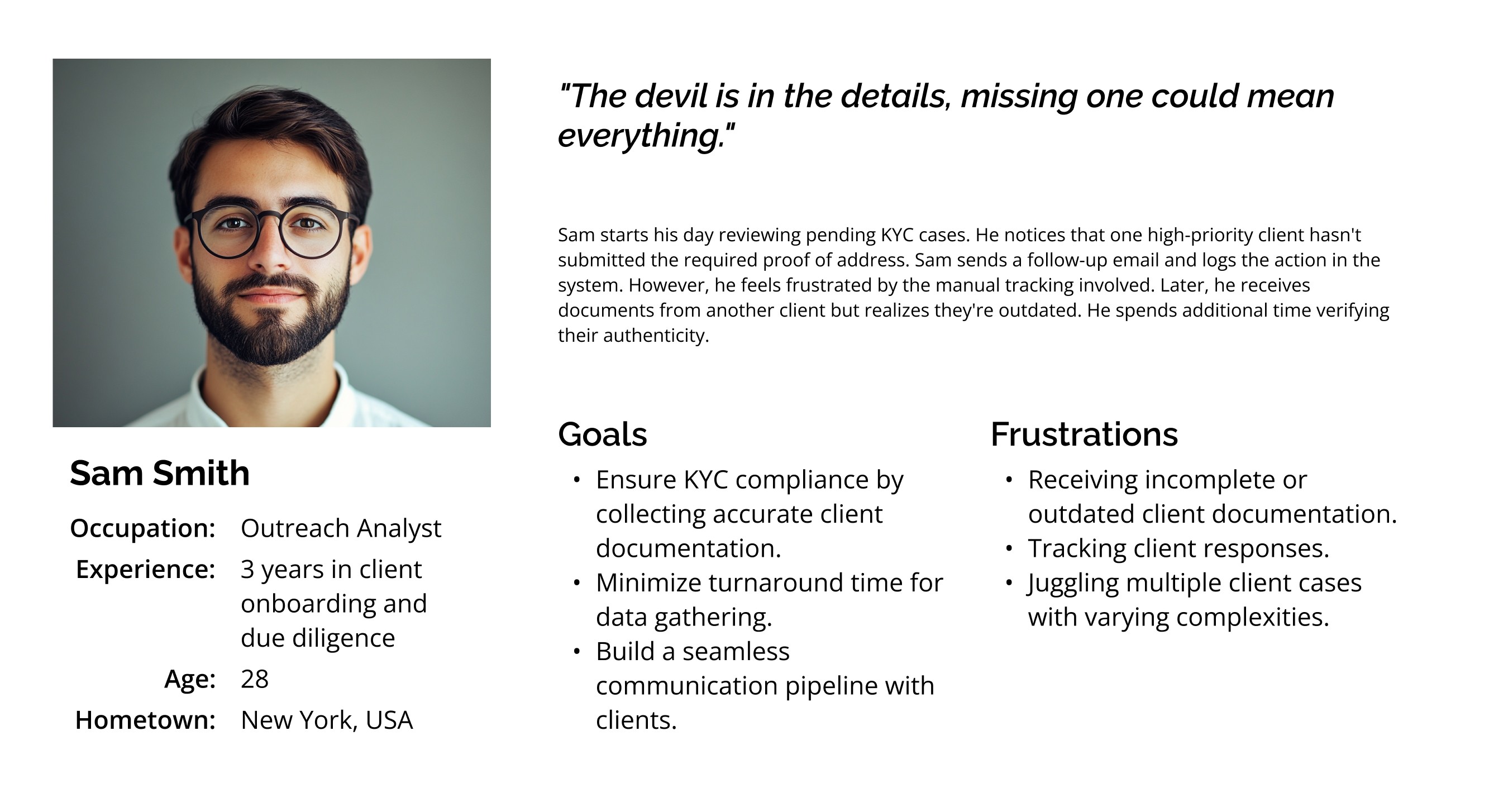
Outreach Analyst
Problem Statement:
Sam is a detail-oriented Outreach Analyst who needs a efficient way to track client documentation and follow-ups to ensure KYC compliance efficiently. This is because he often receives incomplete or outdated documents and spends too much time manually tracking client responses, making it difficult to manage multiple complex cases simultaneously.
03
User group
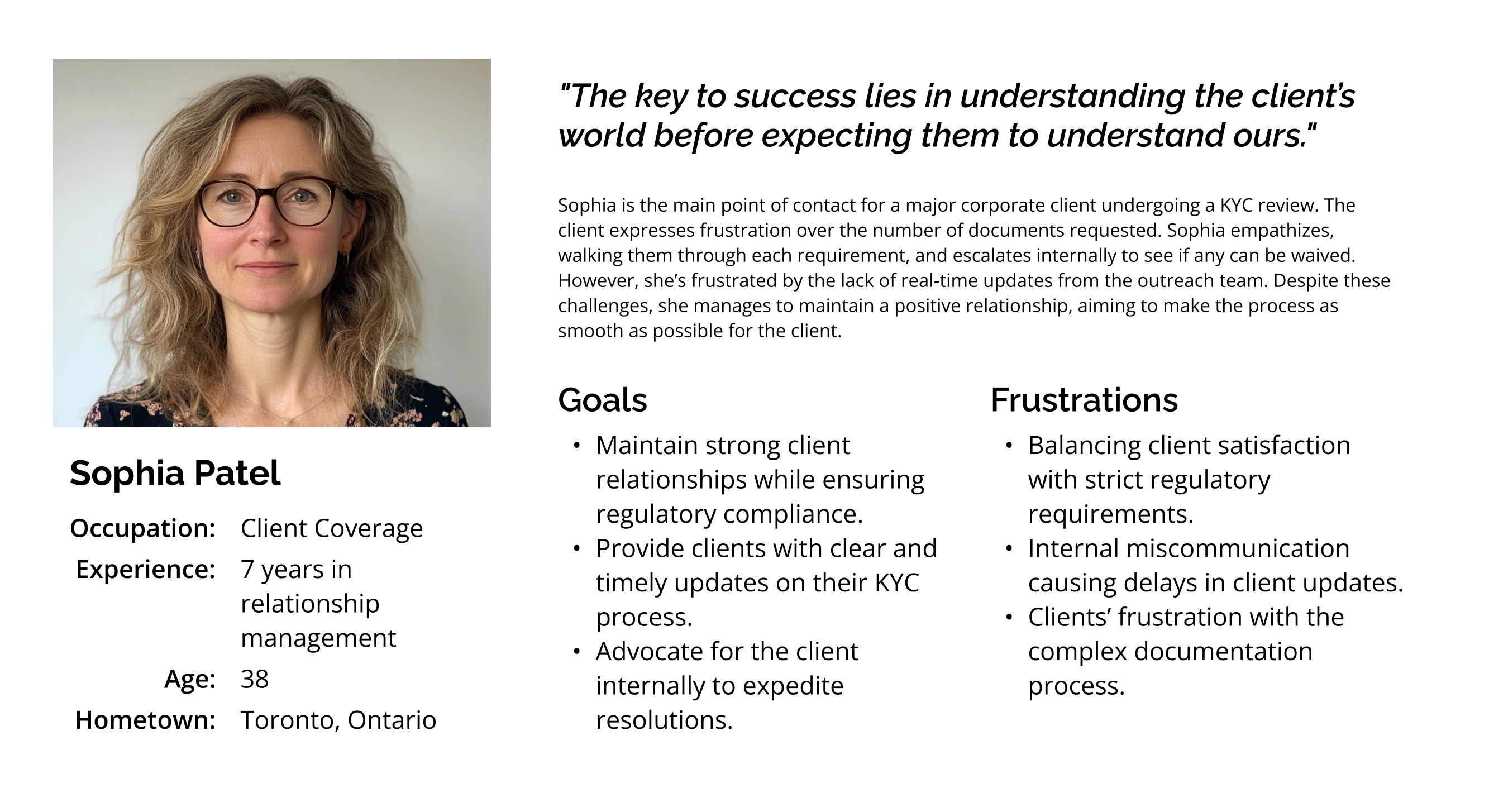
Client Coverage Specialist
Problem Statement:
Sophia is an experienced Client Coverage Specialist who needs a way to provide clear and timely updates to her clients on their KYC process while balancing client satisfaction and regulatory compliance. This is because she struggles with internal miscommunication and lacks real-time updates from the outreach team, which leads to delays and increased client frustration.
Decide if AI adds value to the existing features
map existing mental models
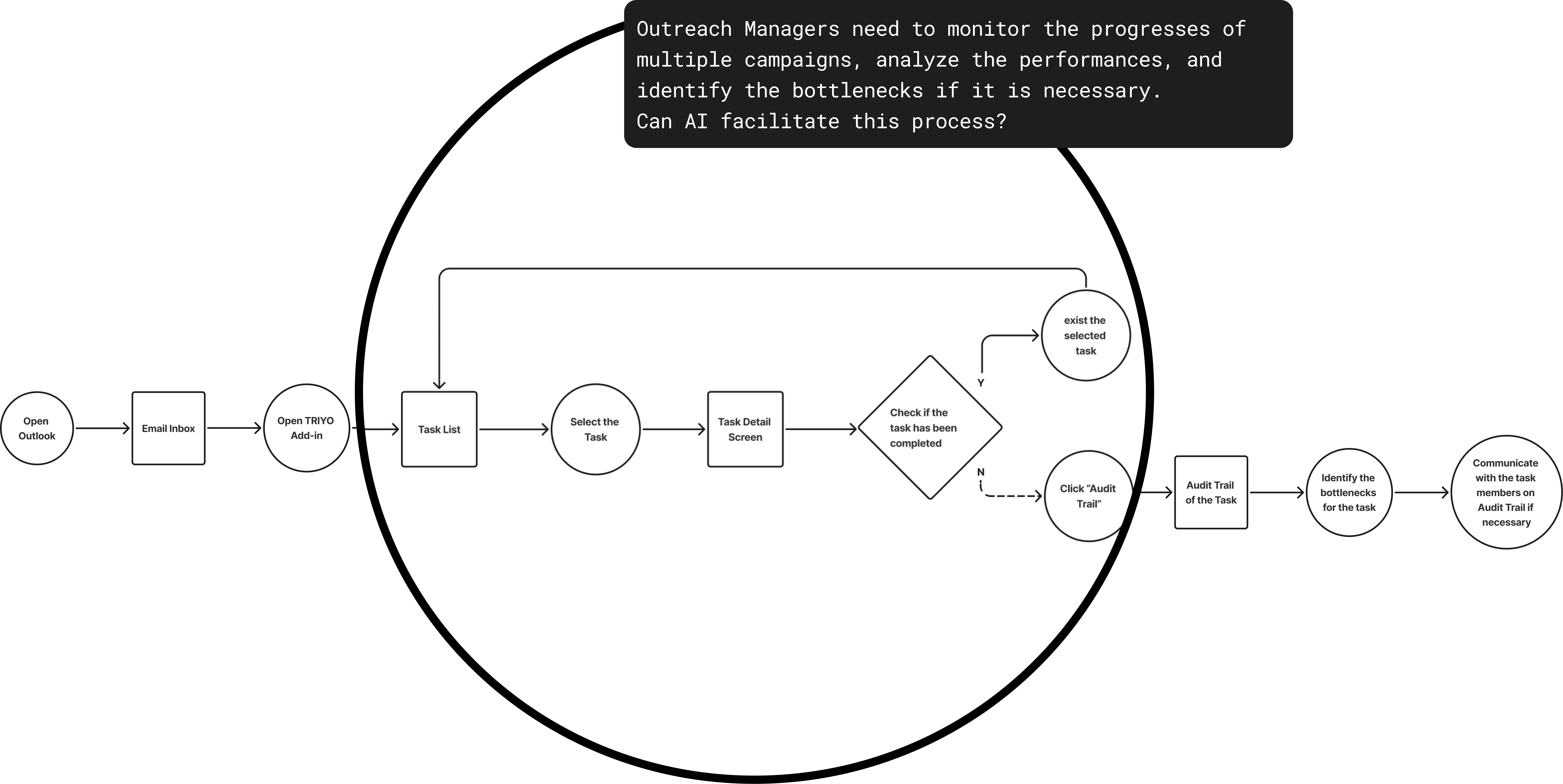
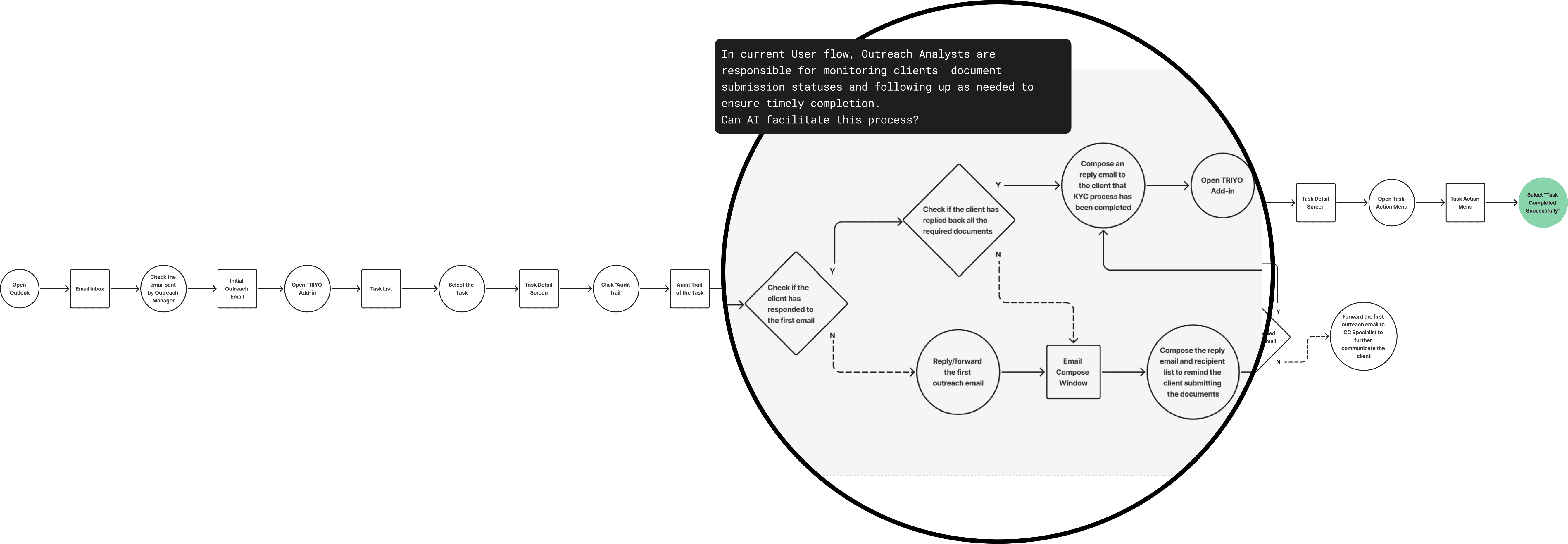
We began by analyzing how financial professionals currently use TRIYO add-ins to solve their problems, aiming to understand their existing mental models and identify opportunities where AI could enhance their workflows.
01
User Flow
Outreach Manager
02
User flow
Outreach Analyst
03
User flow
Client Coverage
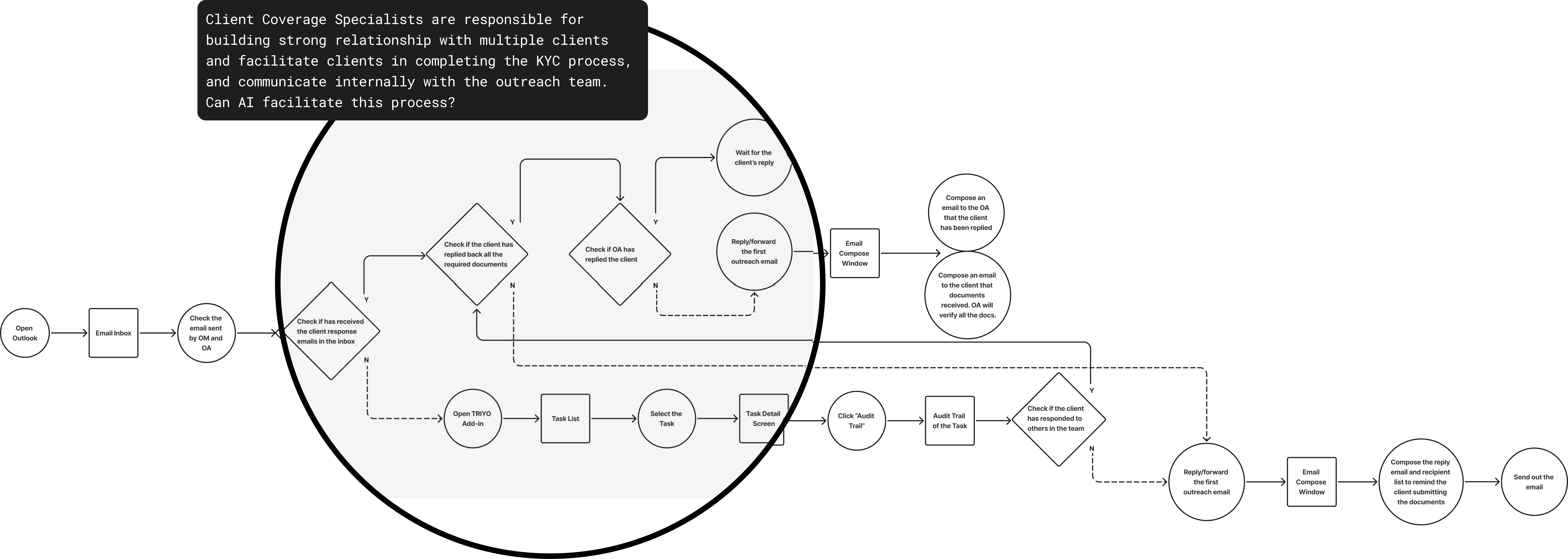
Decide if AI adds value to the existing features
User Needs
During our brainstorming sessions, we utilized "How Might We…" (HMW) questions to break down the problem statement for each user group. After every HMW… statement, we asked the same question "… can AI offer unique solutions to solve?"
Outreach Manager
HMW…
simplify resource allocation for managers within the project?
help managers analyze each campaign's performance?
help managers quickly identify bottlenecks in the campaign?
…Can AI offer unique solutions to the challenges?
Outreach Analyst
HMW…
support analysts in communicating more effectively and professionally with clients?
help analysts efficiently track all essential documents sent by clients?
help analysts quickly track the progress of multiple campaigns?
…Can AI offer unique solutions to the challenges?
Client Coverage Specialist
HMW…
help Client Coverage Specialists efficiently track clients' most recent responses?
help Client Coverage Specialists effectively monitor the relationship between the client and outreach team?
help Client Coverage Specialists foster a good relationship between the client and the outreach team?
support Client Coverage Specialists keep track the updates of multiple campaigns?
…Can AI offer unique solutions to the challenges?
These HMW questions were further organized into broader categories, allowing us to explore potential AI-driven solutions more effectively.
Communication Related
HMW…
Support analysts in communicating more effectively and professionally with clients
Help Client Coverage Specialists foster a good relationship between the client and the outreach team
AI Features
Suggests professional, context-aware email templates.
Provides tone analysis, recommendations, or revisions for improved clarity and professionalism during email communication
Data-Driven Insights
HMW…
Help analysts quickly track the progress of multiple campaigns
Simplify resource allocation for managers within the project
Help managers analyze each campaign's performance
Help Client Coverage Specialists effectively monitor the relationship between the client and outreach team
Support Client Coverage Specialists in keeping track of updates across multiple campaigns
AI Features
Consolidate and visualize real-time campaign progress, highlighting key milestones and pending tasks.
Predicts optimal resource allocation based on historical project data, current workloads, and deadlines.
Summarize multiple campaigns' performances
Uses predictive analytics to identify trends, success factors, and areas for improvement across campaigns.
Key Event Detection & Monitoring
HMW…
Help managers quickly identify bottlenecks in the campaign
Help Client Coverage Specialists efficiently track clients' most recent responses
AI Features
Analyzes campaign workflows to identify delays, resource constraints, or underperforming stages.
Automatically tracks the most recent client responses and flags overdue follow-ups or critical responses requiring attention.
After this exercise, we identified key user needs and the corresponding AI features that could enhance their workflows. Based on these insights, we concluded that:
Implementing an AI-powered chatbot would be an ideal starting point for introducing AI capabilities within TRIYO. We believe it can significantly enhance task management and communication tracking of TRIYO by providing actionable insights and assisting with manual works. By identifying patterns and key events that would otherwise be time-consuming to detect, the chatbot can optimize workflows and improve overall efficiency.
How will aI solve the problem
Reward function for TRIYO aI Model
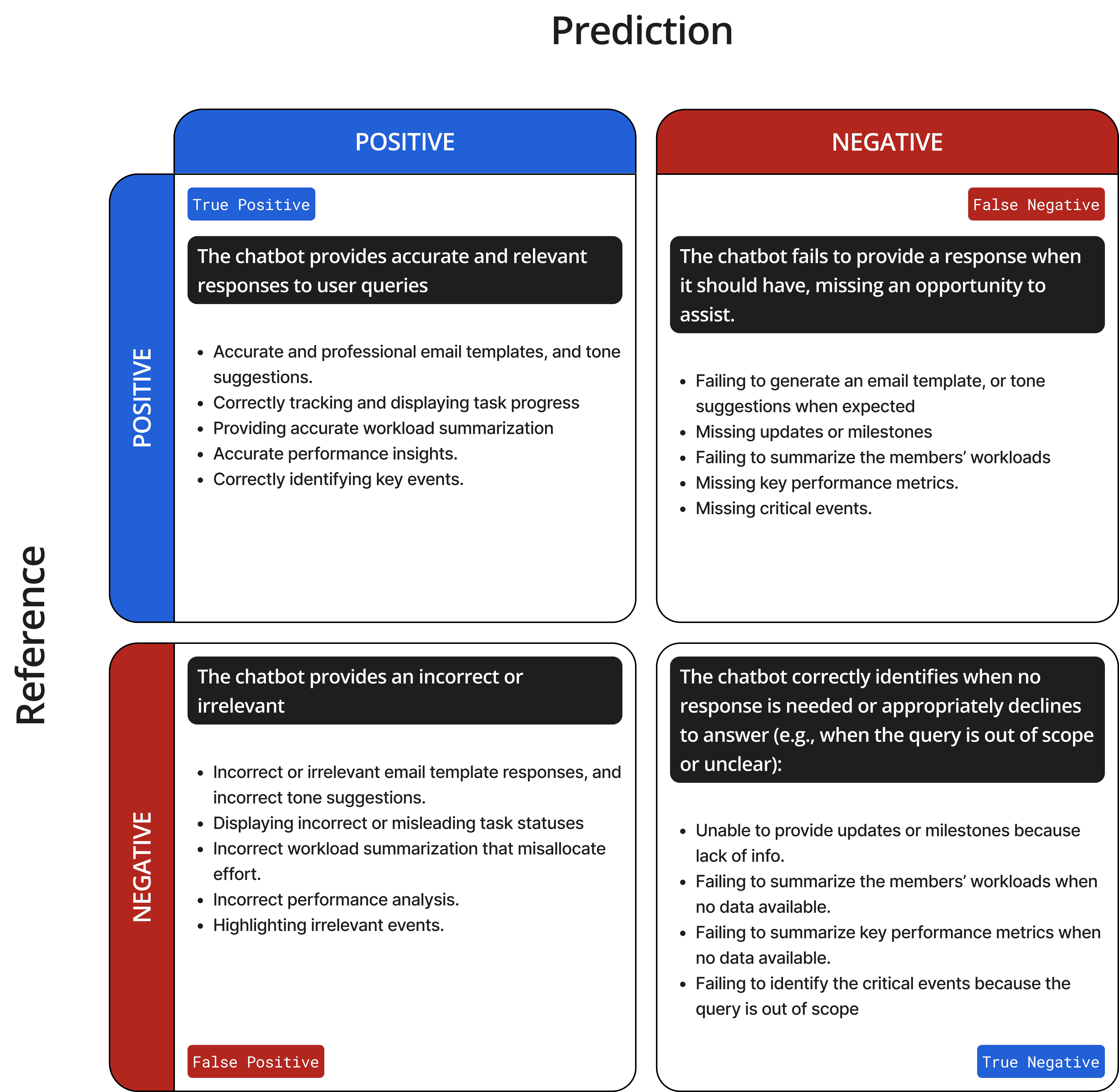
prioritize precision or recall?
According to the Google People + AI Guidebook, prioritizing precision ensures that users can trust the AI chatbot to provide accurate and reliable responses (true positives). However, this approach may result in more false negatives, where the chatbot fails to respond when expected.
On the other hand, prioritizing recall would allow the chatbot to return all potentially relevant responses based on user prompts. The tradeoff is an increased likelihood of false positives, where some responses may be incorrect or irrelevant.
Since TRIYO’s target users are financial professionals operating in high-stakes environments, where inaccurate financial information could lead to serious legal or financial risks, our AI model will be optimized for precision. This ensures the chatbot provides accurate and trustworthy information, reducing the risk of incorrect advice that could result in regulatory or financial consequences.
We recognize that this tradeoff may lead to missed opportunities to respond (higher false negatives), potentially leaving some user queries unanswered. However, prioritizing accuracy is critical to maintaining user confidence and minimizing risk.
define Key Failure Indicator (KFI)
To address potential negative impacts and establish KFIs for the feature, all stakeholders collaborated to align on the appropriate performance evaluation checkpoints. Regular evaluations based on these criteria will be conducted after the feature is launched to ensure its ongoing effectiveness.
01
Key Failure Indicator
User Satisfaction
If user satisfaction score for the AI Chatbot drops below 85%, we will conduct a user feedback survey and implement improvements based on common issues identified.
02
Key Failure Indicator
Response Time
If response time for the AI chatbot goes above 1 minute, we will optimize system's data processing pipeline and improve query handling efficiency
High-Fidelity design
AI Chatbot Prototype
The interactive prototype was also requested by the sales team for important client demos and fundraising purposes. Given the tight timelines, we opted to start with high-fidelity screens, a decision that comes with both benefits and challenges.
On the positive side, high-fidelity prototypes closely resemble the final product in terms of design, interactivity, and functionality, enabling stakeholders and clients to visualize the end result more accurately. However, focusing on visual details too early can divert attention from addressing core functionality and user flow issues. Additionally, stakeholders may perceive the prototype as a near-final product, potentially leading to unrealistic expectations regarding development timelines.
Launch Chatbot within TRIYO Add-in
Within the TRIYO Add-in, the AI Chatbot is accessible via a floating button in the Task Audit Trail, where users can track all email and system updates related to a task. The AI chat window initially opens in a compact mode to provide users with more context (task heading) in a small screen, while a maximized view offers more space for in-depth conversations when needed.
Access TRIYO AI from Task Audit Trail
Introducing AI features
Onboarding is crucial for introducing new features to users. When first-time users of the AI Chatbot access any Task Audit Trail screen, an "inboarding" message appears to introduce the chatbot. Given the importance of efficiency for financial professionals, the message is designed to be brief and actionable, encouraging users to quickly experiment with the feature.
Suggested Prompts
Suggested prompts were designed to provide users with quick shortcuts for entering queries. These prompts are generated based on the data within the current task, including task details, email communications, and previous AI interactions. The Refresh button allows users to update and regenerate the suggested prompts as needed.
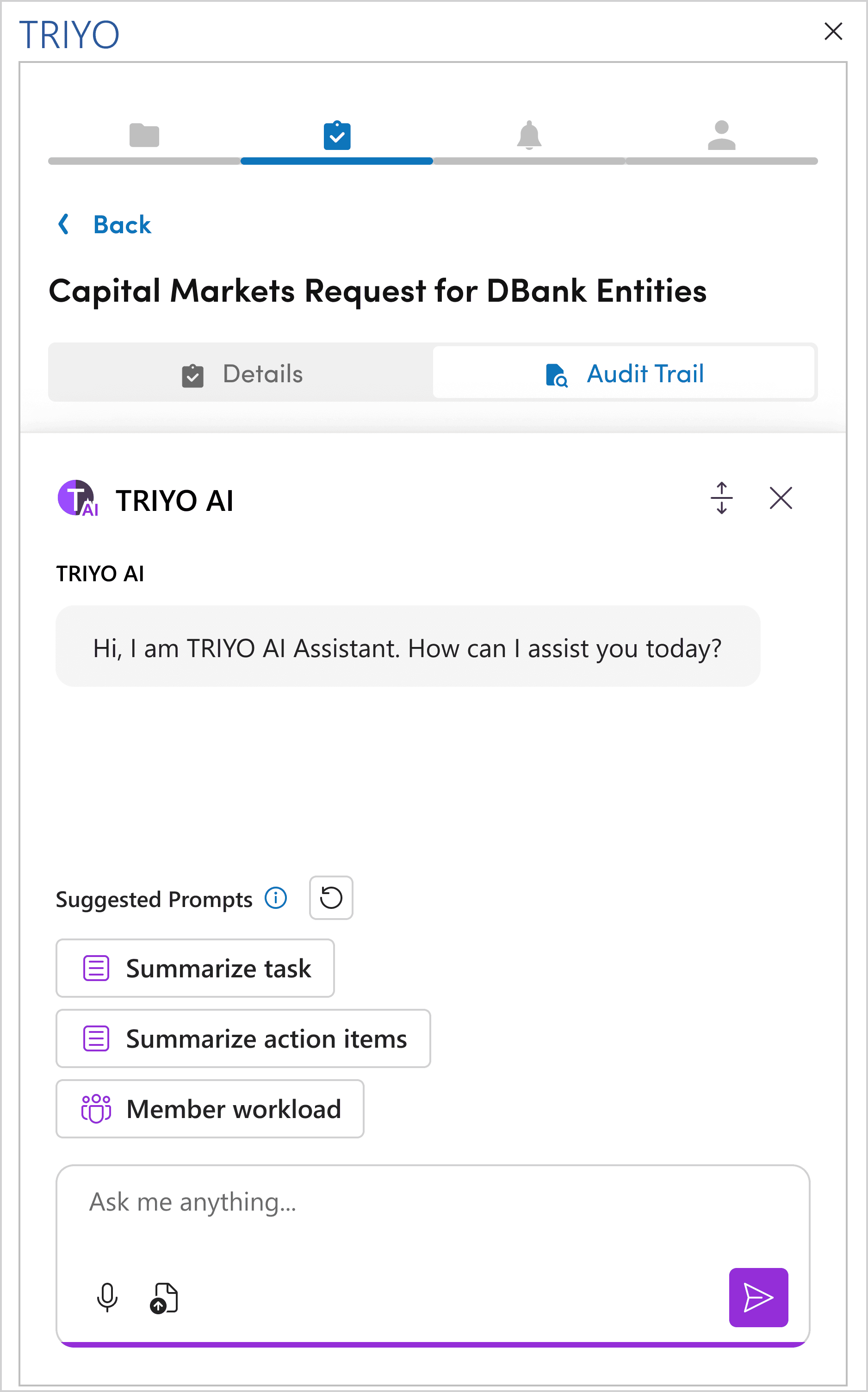
Once the first question is entered into the chatbot, the suggested prompts collapse into a menu button, creating more space for users to interact with TRIYO AI. The full list of suggested prompts remains accessible at any time by clicking the menu button.
We decided to include an icon in front of each prompt to reduce cognitive load and help users quickly identify and select the most relevant prompt in this text-heavy screen.
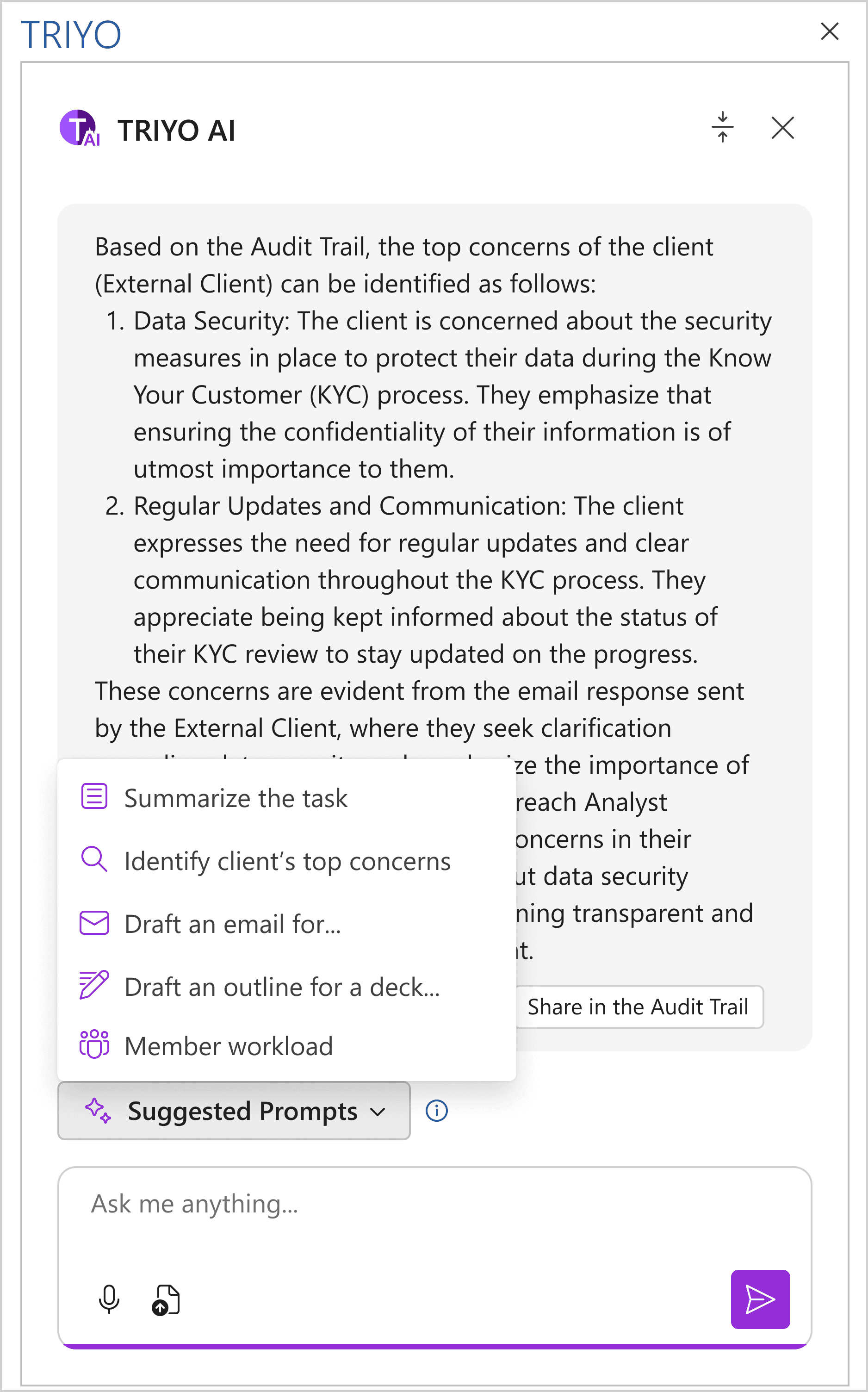
In the original design, each prompt was paired with a unique icon.
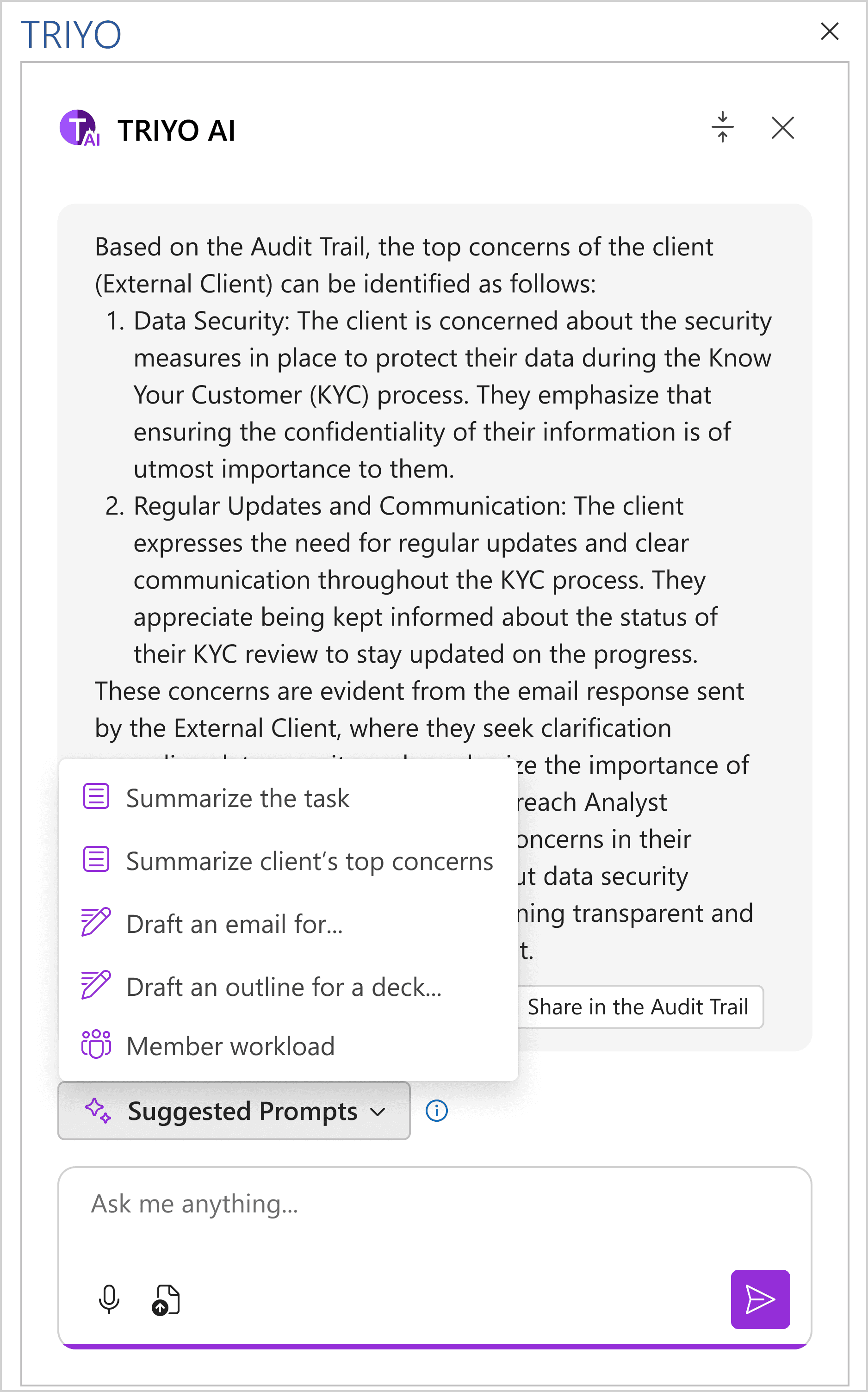
After discussions with the developers, we realized that assigning a unique icon to every dynamic prompt would be difficult to implement. To address this, we decided to standardize the icon selection by assigning a specific icon to each broad category, such as "Summarize…" and "Draft…".
The financial industry is particularly cautious about the data sources used and collected by software. To build trust with our users, we included an information icon to clearly explain the data sources used for generating the suggested prompts.
account for errors
Sometimes, the AI model may be unable to generate responses due to various types of errors. If the chatbot fails to provide an answer, how can we effectively communicate this to users?
In cases of true negatives (see the Reward Function section), the chatbot may be unable to generate a response due to insufficient input data, a situation known as a Failstate. For instance, if a user asks, "Summarize all the email communications so far," but no emails are linked to the task, the chatbot cannot provide an answer. To assist users in resolving this issue, a message is displayed with two action buttons:
Contact Support: Opens an email compose window, allowing users to send a support request directly to our client support team.
How to Link Emails: Provides a detailed explanation on how to link emails within the TRIYO platform, offering step-by-step guidance.
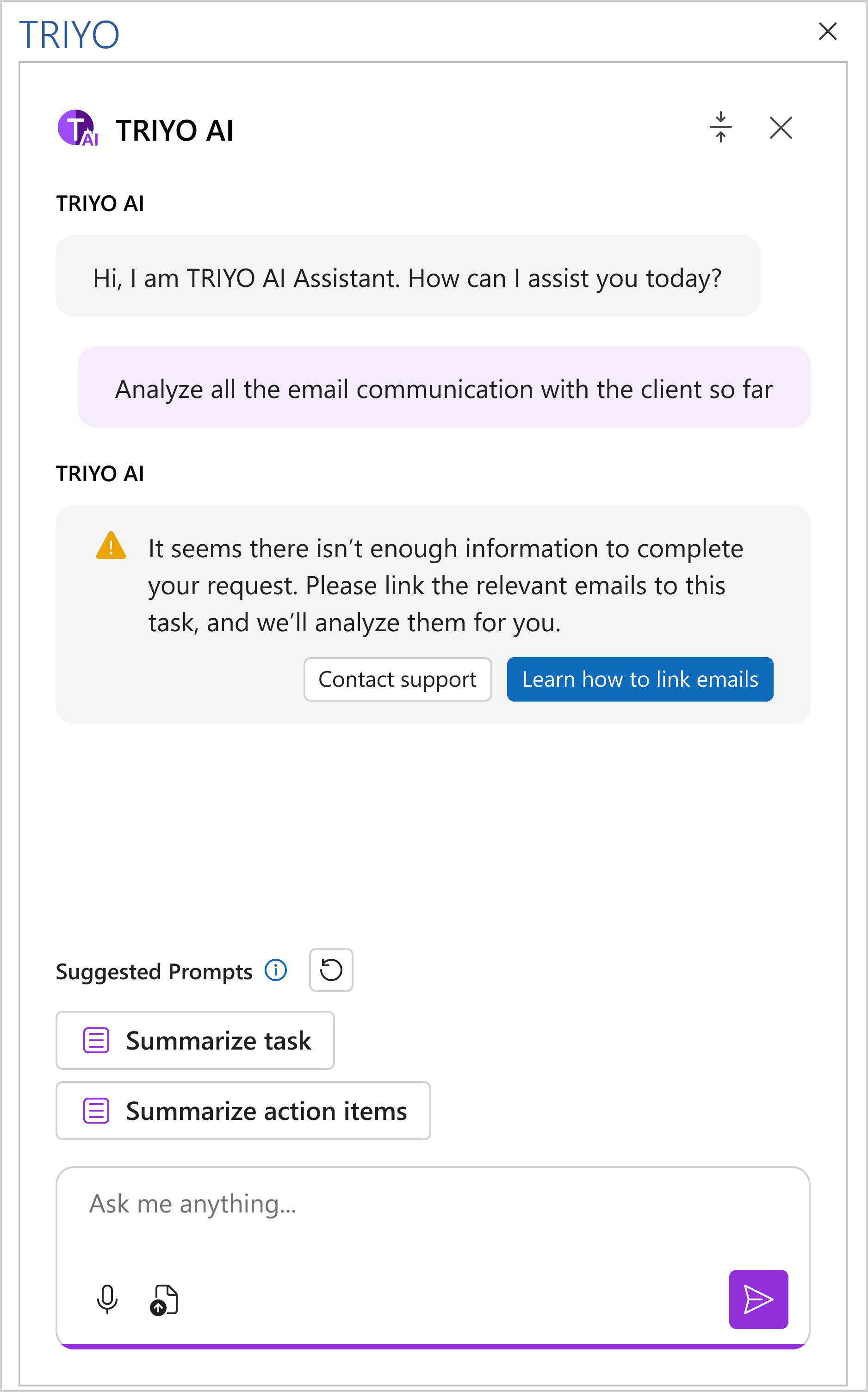
Messages are displayed to inform users about the inputs TRIYO AI requires to generate outputs, while also providing an explanation of how the AI chatbot operates.
Collecting feedbacks
Feedback is crucial for improving and fine-tuning the AI model, as well as providing valuable data for future enhancements to the user experience. We collect two types of feedback:
Implicit Feedback: This includes data on user interactions with the interface, such as the time it takes for users to receive AI responses after entering a prompt. During the implementation of this AI project, the team considered using tools like Pendo and Hotjar to capture this data.
Explicit Feedback: This is direct input from users regarding the AI’s performance. To facilitate this, we designed a feedback collection system specifically for evaluating the outputs generated by the TRIYO AI Chatbot.
Thumbs up and thumbs down ratings are used to measure user satisfaction with TRIYO AI’s responses. This feedback serves as a key data point for calculating the user satisfaction rate, one of the project’s core success metrics.
Suggested Actions
After each AI response, users will see a set of suggested actions tailored to their next steps. For example, if you ask the AI to draft an email template, it might suggest using the template to compose a new email. In this case, a "Compose an Email" option will appear right below the response, making it simple and convenient to proceed.
For outreach scenarios, this feature helps analysts and client coverage professionals respond to clients more efficiently by providing ready-to-use communication templates and shortcuts for composing emails. This streamlines interactions and ensures timely, effective communication.
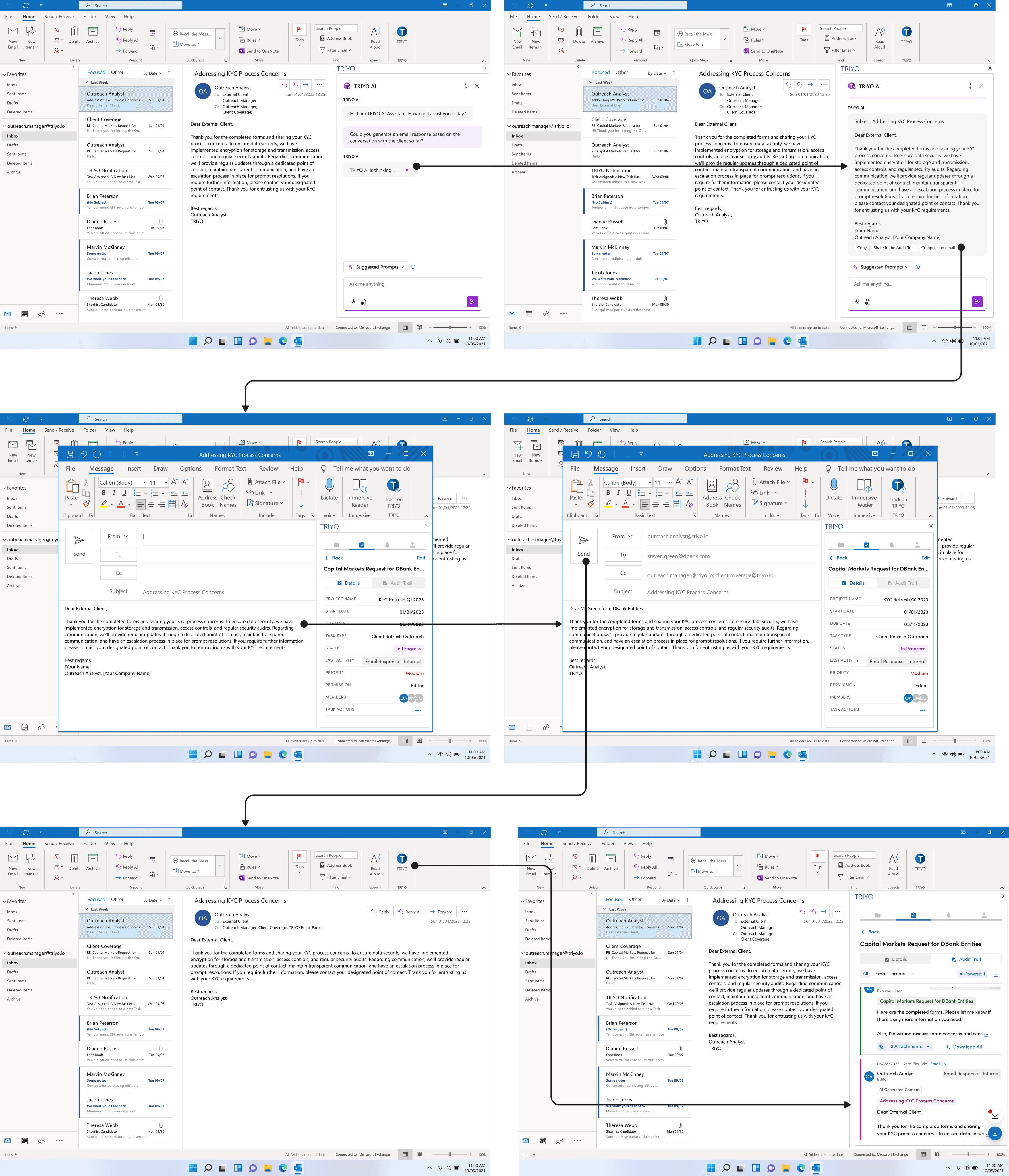
Users can easily load the email template into the compose window by clicking the suggested shortcut below the AI response. Once the email is sent, it will be automatically tracked under the same task and recorded in the Task Audit Trail for easy reference.
Implementing this feature not only match up with current use case, this "suggested actions" feature is highly scalable, as it can dynamically adapt to various workflows and integrate with external platforms, such as Salesforce. By linking AI-driven suggestions to third-party tools, this feature allows users to seamlessly transition between systems, enhancing productivity and reducing the need for manual data transfers.
For instance, after the AI generates a summary, a suggested action like "Link to Salesforce" can allow users to log an AI generated content directly as part of a client’s record in Salesforce. This not only streamlines workflows but also ensures data consistency across platforms.
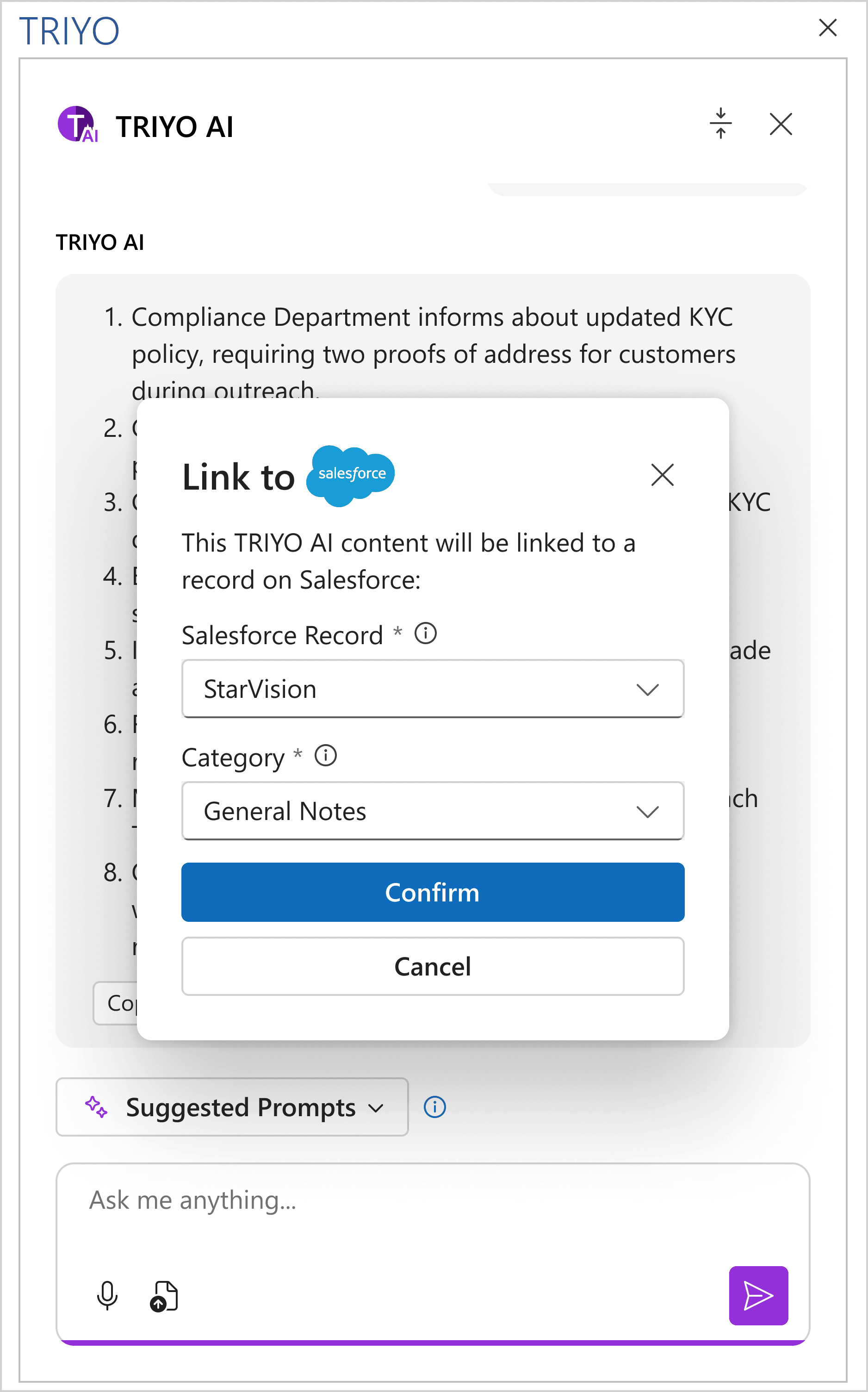
Confirmation Modal for linking to the Salesforce
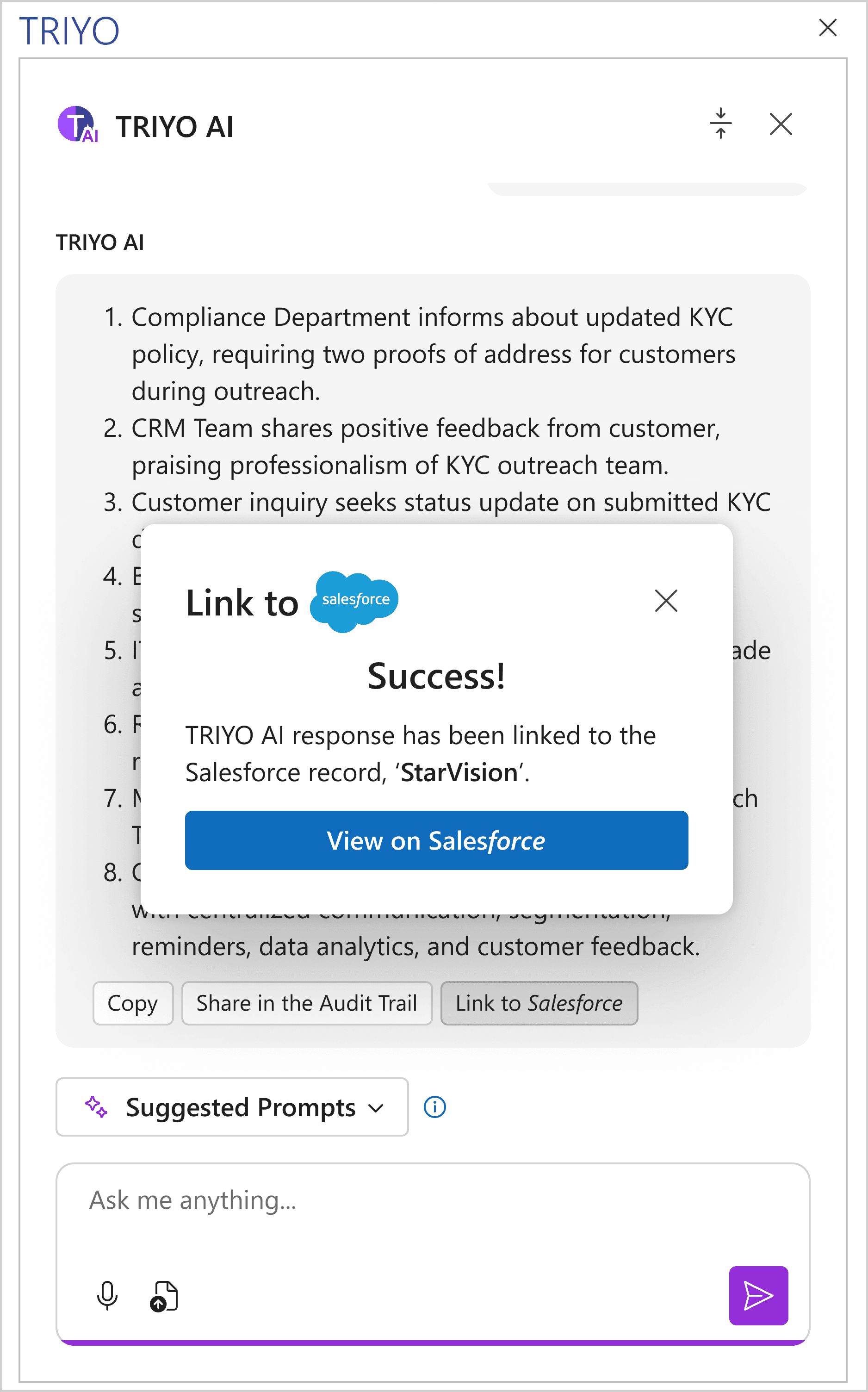
Success Screen
The scalability of this feature comes from its ability to accommodate an expanding range of integrations over time. However, there are constraints to consider. As integrations with multiple platforms are added, the interface risks becoming cluttered with too many suggested actions or options, overwhelming users. A well-designed categorization or prioritization system is necessary to display the most relevant actions without overloading the user.
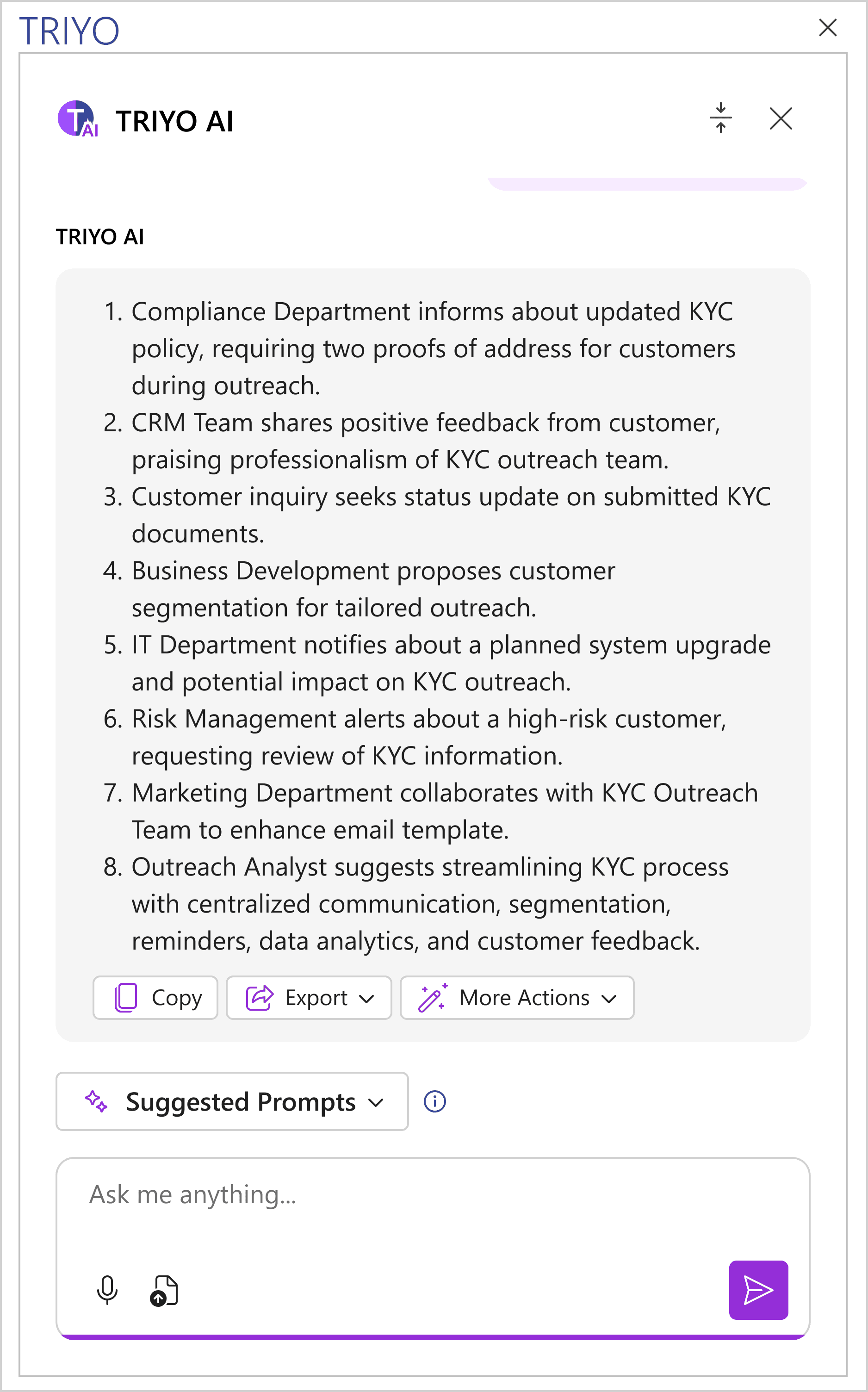
Group actions into logical categories, such as "Share", to reduce cognitive load and make the interface cleaner
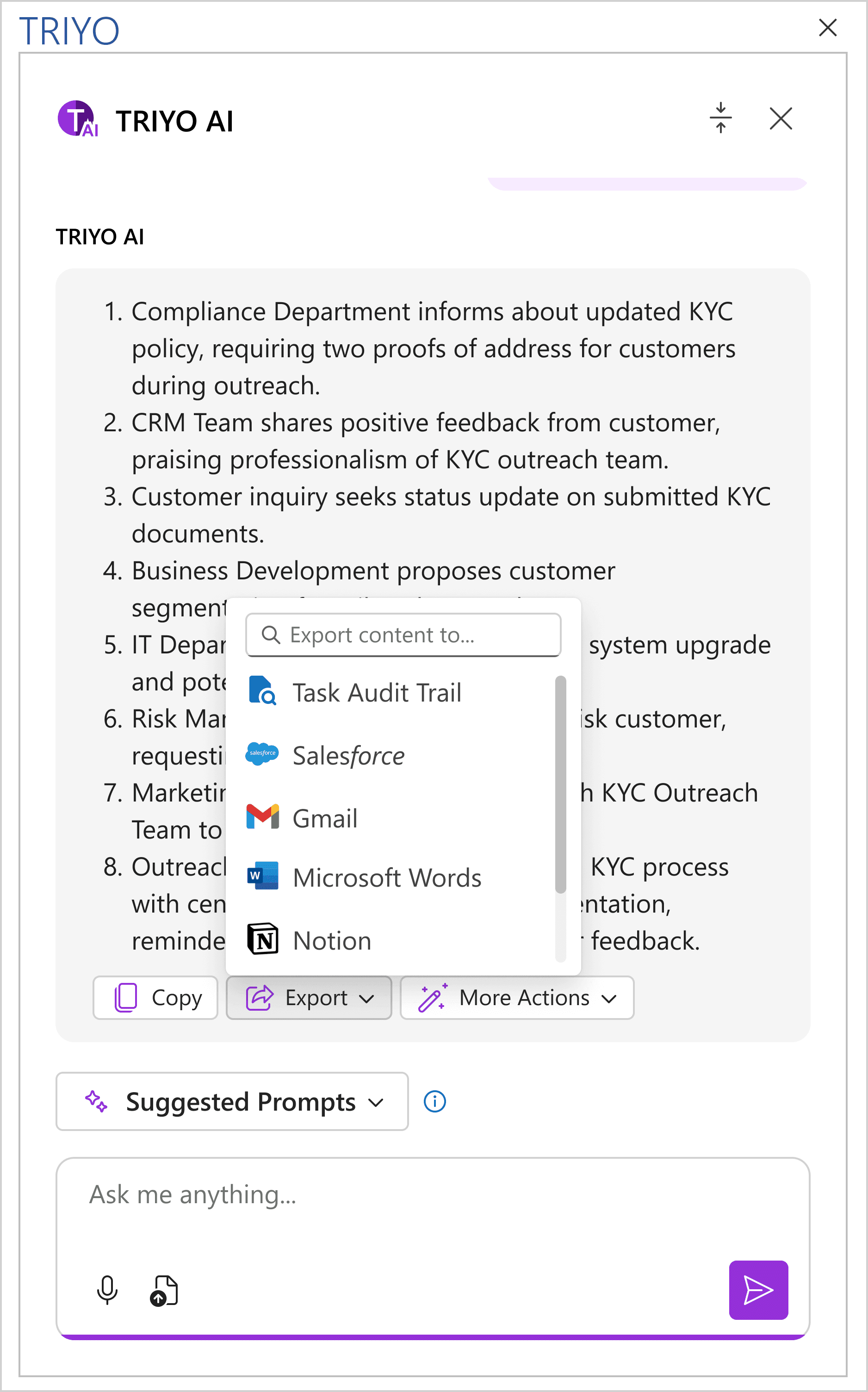
The expandable menu displays related options, with a search bar included for quickly finding the desired option
track aI usage
We integrated the AI Chatbot feature with the task tracking and reporting capabilities of the Audit Trail. Users can track AI usage directly within the Audit Trail Log, including details such as "How many times AI has been used for this task" and "Which content was generated by AI." In professional settings like financial services, this level of tracking ensures transparency, provides a clear log of interactions, and supports compliance requirements.
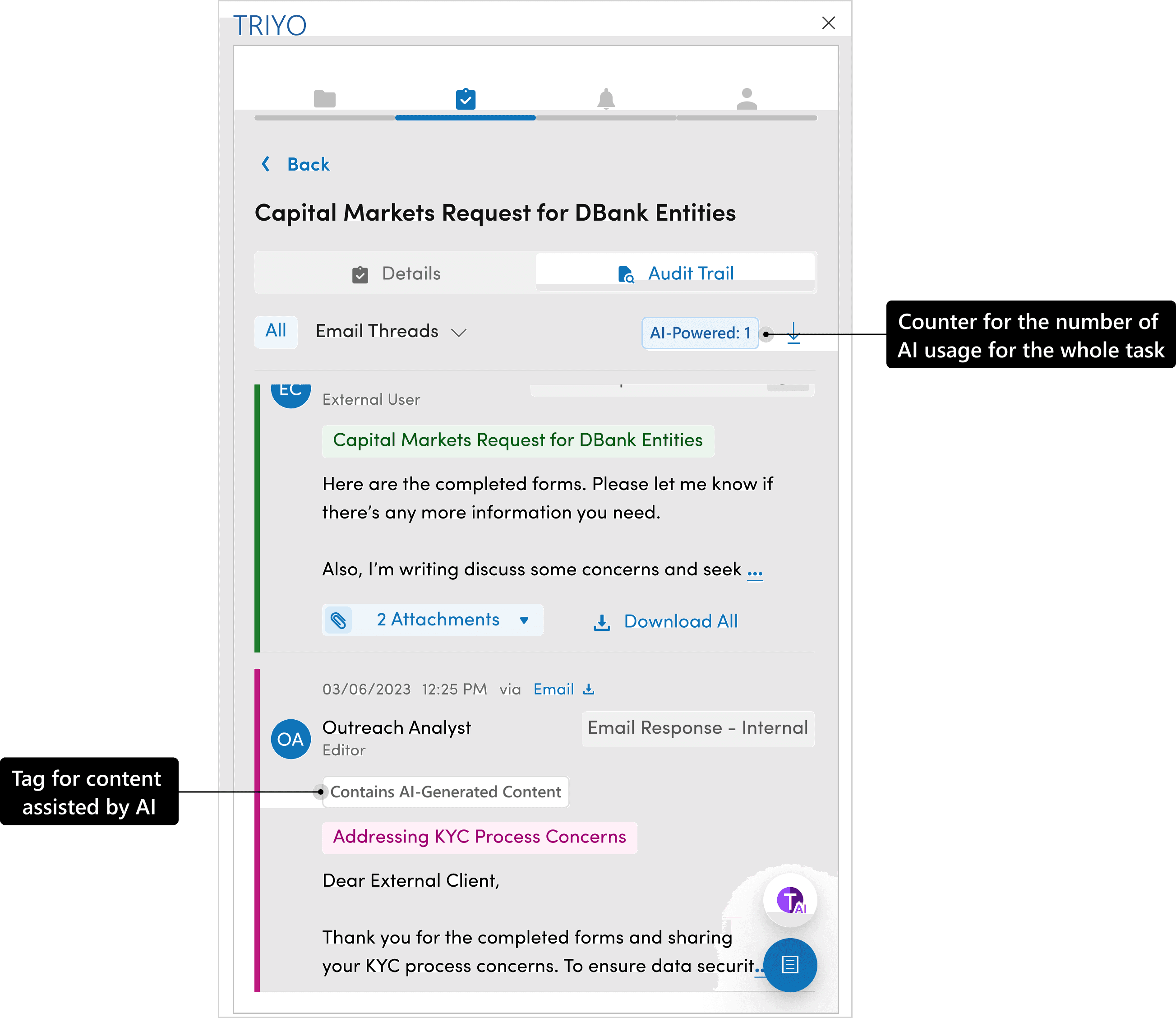
Counter badge to track AI usage and a tag to identify entries containing AI-generated content.
High-Fidelity design
Future Thinking
After the design was handed over to the developers, the product and design teams collaborated to discuss potential future enhancements for the AI chatbot. Below is a list of features we’ve aligned on and outlined for future product planning. The designs serve as exploratory concepts for potential solutions.
Specify the context
In the TRIYO data structure, context is crucial for defining the scope or range of data. For example, users can choose to summarize information related to the current task, the parent project of that task, or all tasks and projects across the platform. To enhance flexibility, a dropdown menu will be designed to allow users to specify the context when asking questions. This ensures that users can tailor their queries to meet their specific needs.
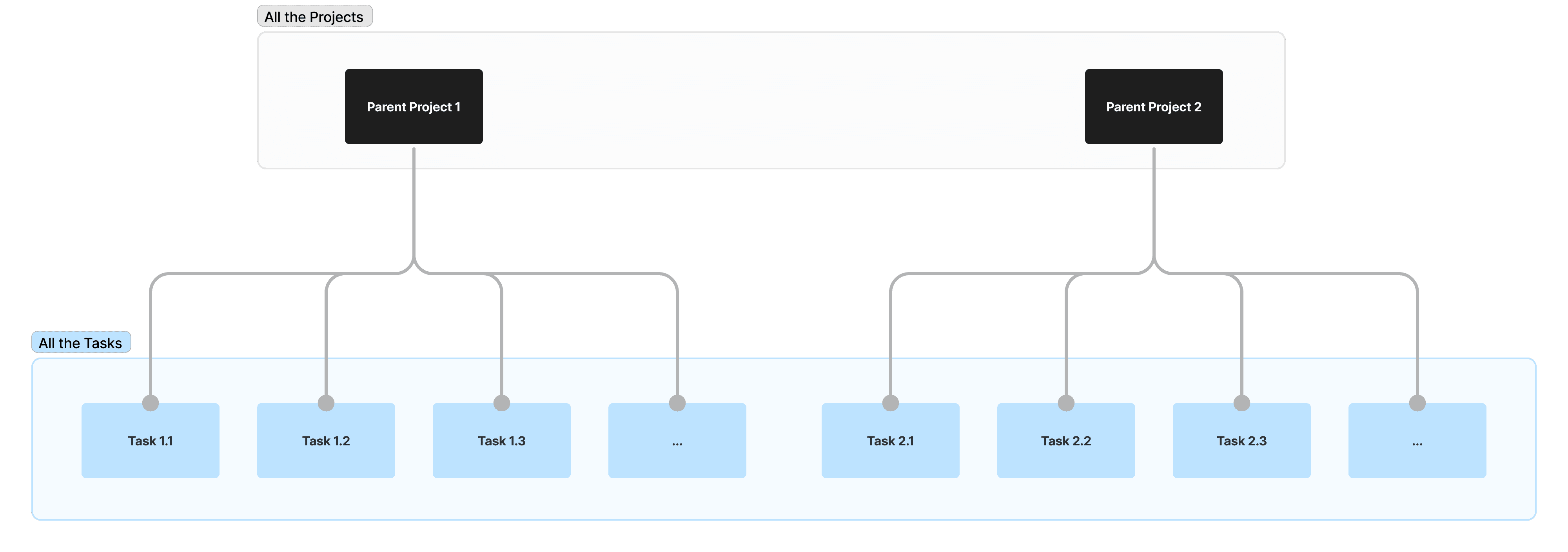
TRIYO Data Structure
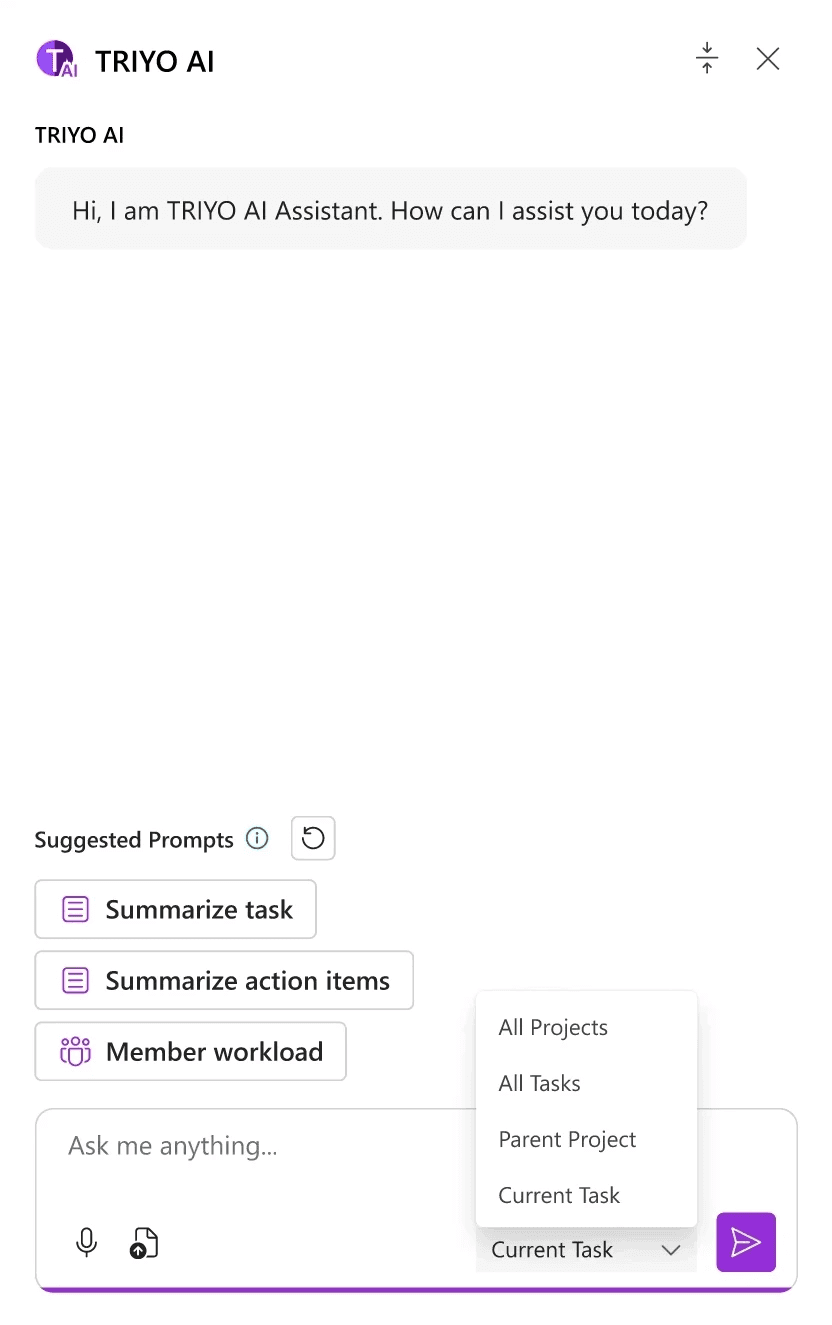
Specify the context for the questions
Data Visualization
The initial TRIYO AI model will generate text-only outputs. However, incorporating visuals could enhance users' understanding of lengthy responses and allow information to be exported as infographics for clearer communication and presentation. To address this, we explored design possibilities for integrating visuals into the outputs.
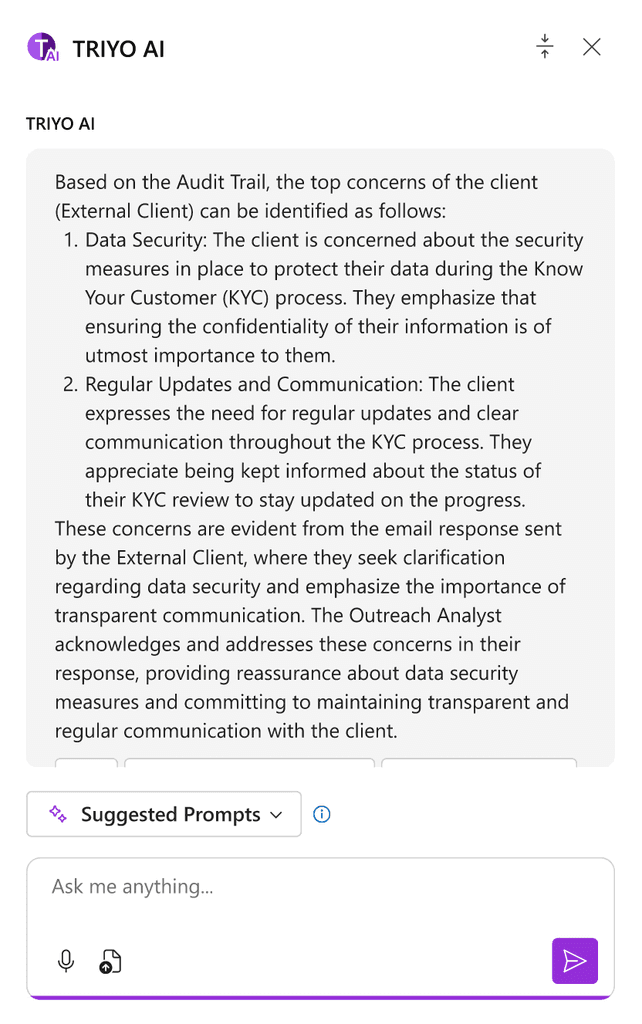
Uses could easily lose focus when digest the text
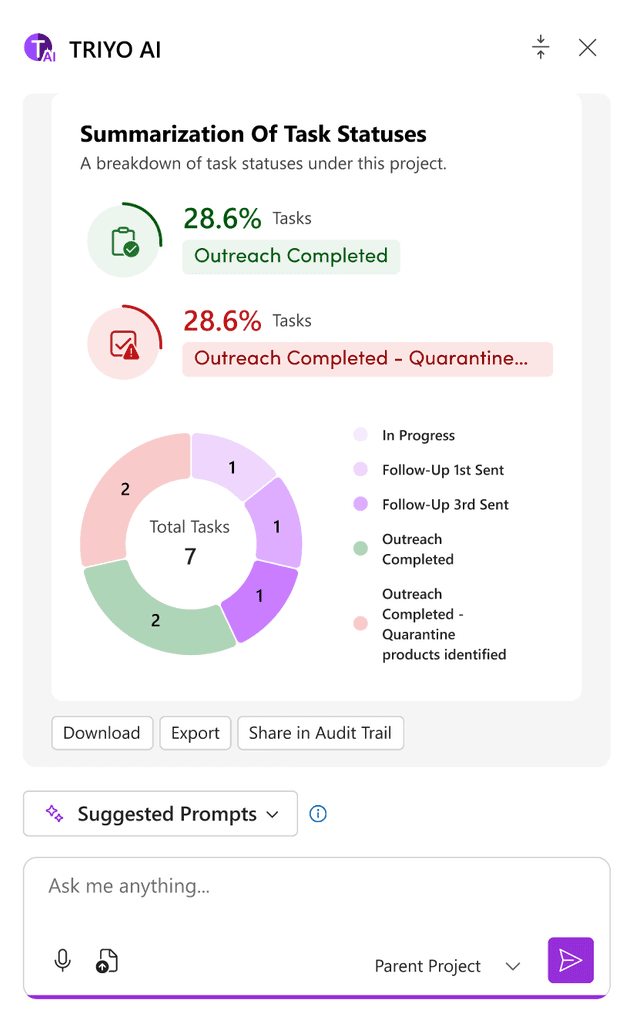
Visualize the numeric data using charts. Download or export functions could be provided for quick user actions.
Other data visualization patterns we explored:
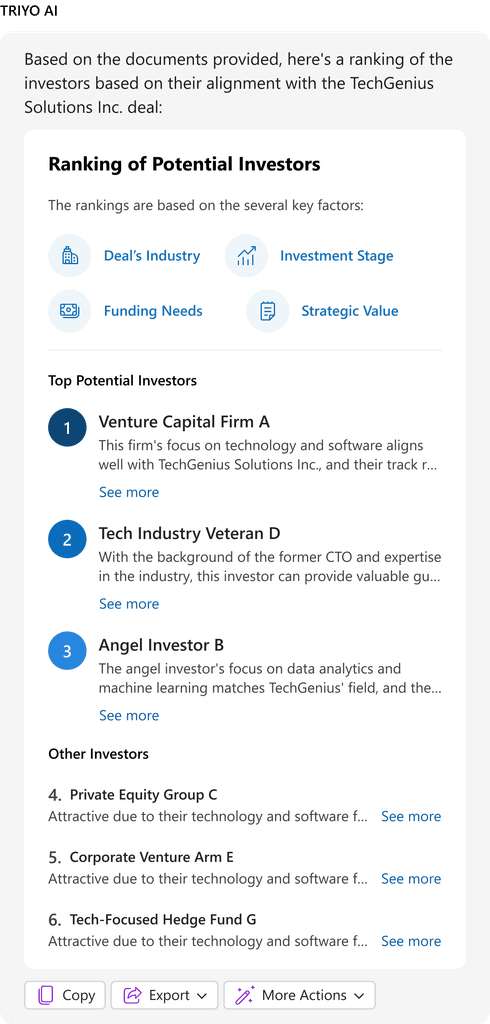
Rank the potential investors
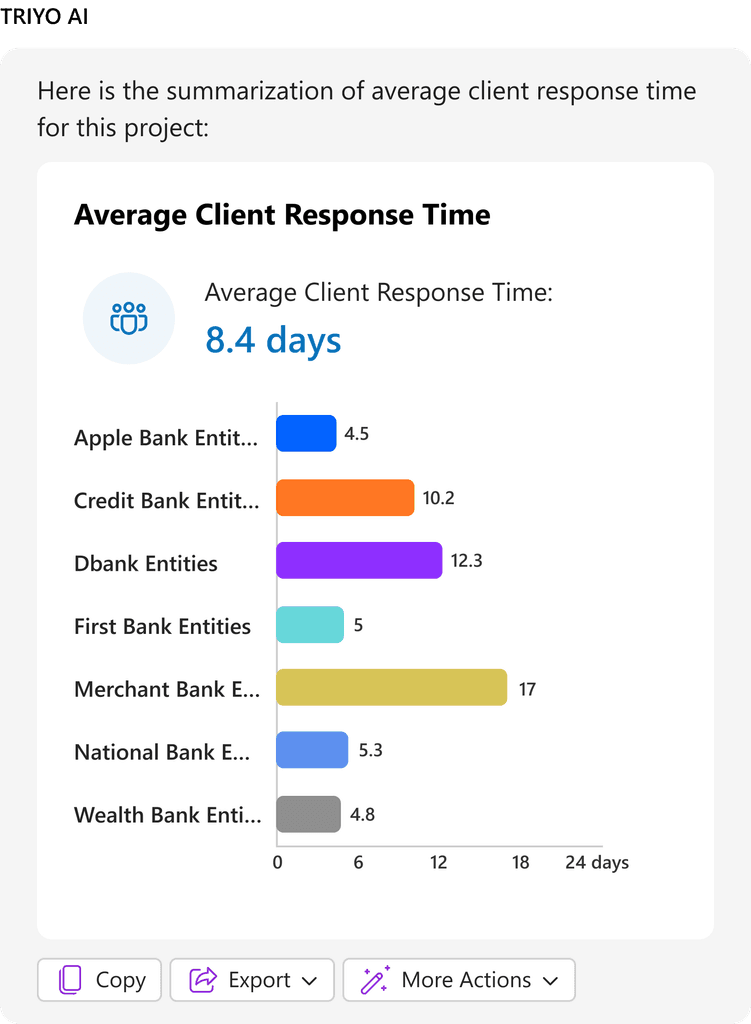
Client Response Time Sumary
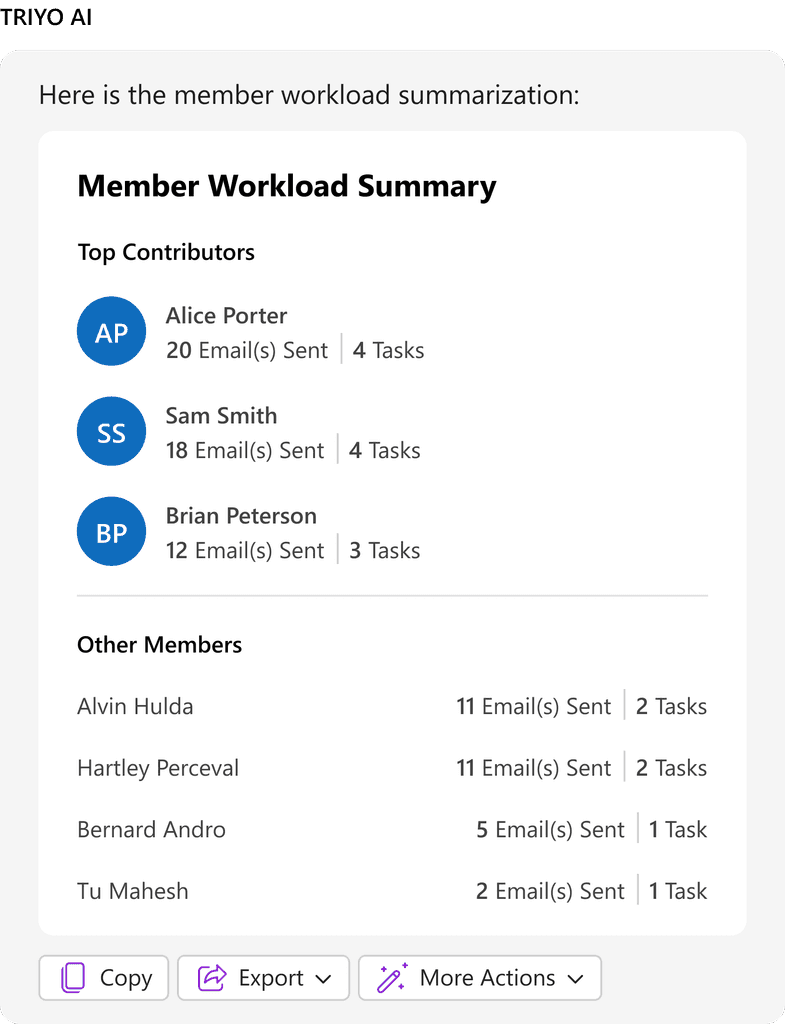
Member Workload Summary
Web Version AI Chatbot
The product vision includes extending the AI Chatbot to the TRIYO web platform. Here is a design exploration on how TRIYO AI Chatbot will function and appear in its web version.
On the web, the chatbot can be accessed from the "Task Editing" page by clicking the TRIYO AI button. Unlike the more compact Add-in interface, the web version features a larger chat window with the flexibility to minimize it when needed. This design aligns with TRIYO's web workflows, which emphasize deep user interaction. The additional screen space enhances the user experience by supporting detailed conversations and providing ample room for tasks requiring comprehensive input or review. This ensures users can fully engage with the chatbot, boosting both productivity and usability.
Impacts
Strategic Investment and Engineering Prioritization
This project has already demonstrated significant impact by securing strategic funding, underscoring its value and alignment with the company’s business goals for implementing its first AI-powered feature.
Phase one of the project has been carefully scoped and prioritized into the sprint backlog for engineering, ensuring a structured approach to development. This milestone marks a critical step toward turning the vision into reality, with dedicated resources and timelines allocated to bring the AI feature to life.
By integrating AI into the company’s offerings, this project lays the foundation for future innovation and differentiation in the market.
References
Materials and resources Mentioned
Google PAIR. People + AI Guidebook. Accessed Nov 6, 2024. https://pair.withgoogle.com/guidebook.
Hotjar Ltd.. hotjar by Contentsquare. Accessed Nov 6, 2024. https://www.hotjar.com/.
Pendo.io, Inc.. Pendo. Accessed Nov 6, 2024. https://www.pendo.io/.
TS Analytics Canada Ltd. TRIYO. Accessed Nov 6, 2024. https://triyo.io/.